
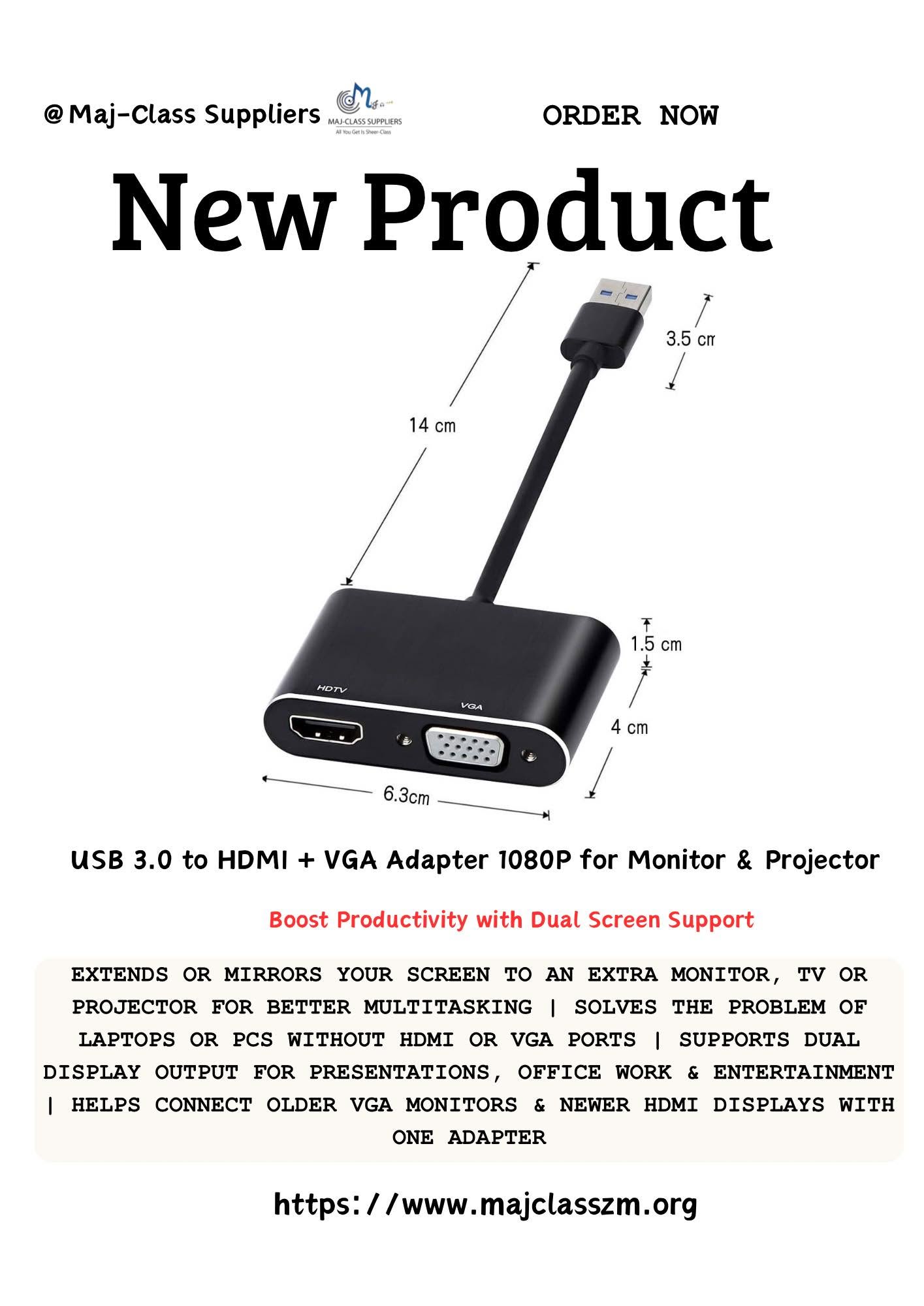
Description
USB 3.0 to HDMI + VGA Dual Display Adapter – Full HD 1080P External Video Converter for Windows PC & Laptop
Expand your workspace and connect your Windows PC or laptop to external displays with this USB 3.0 to HDMI + VGA Dual Display Adapter. Designed for productivity, presentations, and entertainment, it lets you connect to HDMI and VGA monitors, TVs, or projectors with crisp Full HD 1080P resolution.
Whether you’re extending your desktop for multitasking or mirroring your screen for meetings and presentations, this adapter provides a convenient solution without requiring a dedicated HDMI or VGA port on your computer.
Key Features
- USB 3.0 interface for fast and stable data transmission
- Supports Full HD 1080P video output
- HDMI and VGA display outputs
- Extend or mirror your desktop display
- Compatible with HDMI monitors, VGA monitors, TVs, and projectors
- Compact, lightweight, and easy to carry
- Ideal for work, education, business presentations, and home entertainment
Compatible Devices
- Windows laptops
- Windows desktop computers
- HDMI monitors and TVs
- VGA monitors
- Projectors
Note: Driver installation may be required. This adapter is designed for compatible Windows operating systems and does not support USB-C DisplayPort Alt Mode.
Available in Lusaka, Zambia.
Frequently Asked Questions
What is the USB 3.0 to HDMI + VGA Dual Display Adapter used for?
The USB 3.0 to HDMI + VGA Dual Display Adapter lets you connect a compatible Windows computer to an external display. You can use it with an HDMI monitor, a VGA monitor, a TV, or a projector.
It is ideal for work, presentations, online classes, video playback, and multitasking. You can either extend your desktop to gain more workspace or mirror your screen to share the same content on another display.
Can I use both the HDMI and VGA ports?
Yes. The USB 3.0 to HDMI + VGA Dual Display Adapter supports HDMI and VGA outputs on compatible systems. However, the available display modes depend on your computer and the adapter chipset.
As a result, you can connect one or two external displays for a more productive workspace.
What resolution does the adapter support?
The adapter supports Full HD 1920 × 1080 resolution on compatible devices. This provides clear images for office work, presentations, web browsing, streaming videos, and everyday use.
For the best picture quality, use a USB 3.0 port and a compatible Full HD display.
Do I need to install a driver?
Yes. Most USB 3.0 display adapters require a driver before video output will work correctly.
After installing the correct driver, your computer should detect the connected monitor or projector automatically. Always restart your computer if prompted during installation.
Is the adapter compatible with Windows?
Yes. The USB 3.0 to HDMI + VGA Dual Display Adapter is designed for compatible Windows laptops and desktop computers.
Before purchasing, make sure your computer has a working USB 3.0 port and meets the adapter’s system requirements.
Can I connect the adapter to a projector?
Yes. You can connect the adapter to an HDMI or VGA projector for meetings, classrooms, churches, conferences, or training sessions.
It also works well for home entertainment when you want to display your computer screen on a larger image.
Does the adapter support extended and mirrored displays?
Yes. You can choose between Extend Mode and Mirror Mode in your Windows display settings.
Extend Mode increases your workspace by adding another screen. Mirror Mode shows the same content on both displays, making it perfect for presentations.
Does VGA support audio?
No. VGA only carries video signals.
If you also need sound, use the HDMI connection because HDMI supports both video and audio on compatible Windows computers.
Is this adapter suitable for gaming?
The adapter is mainly designed for office work, presentations, web browsing, and video playback.
Although some games may work, it is not recommended for competitive gaming because USB display adapters can introduce additional latency.
Does the adapter need external power?
No. The adapter receives power directly from the USB 3.0 port on your computer.
This makes installation simple and reduces cable clutter because no separate power adapter is required.
Can I use it with a USB 2.0 port?
Yes, but performance may be lower. USB 2.0 provides less bandwidth than USB 3.0, which can affect display performance.
For the best Full HD 1080P experience, always connect the adapter to a USB 3.0 port whenever possible.
Reviews
There are no reviews yet.